




TL;DR — What You'll Learn
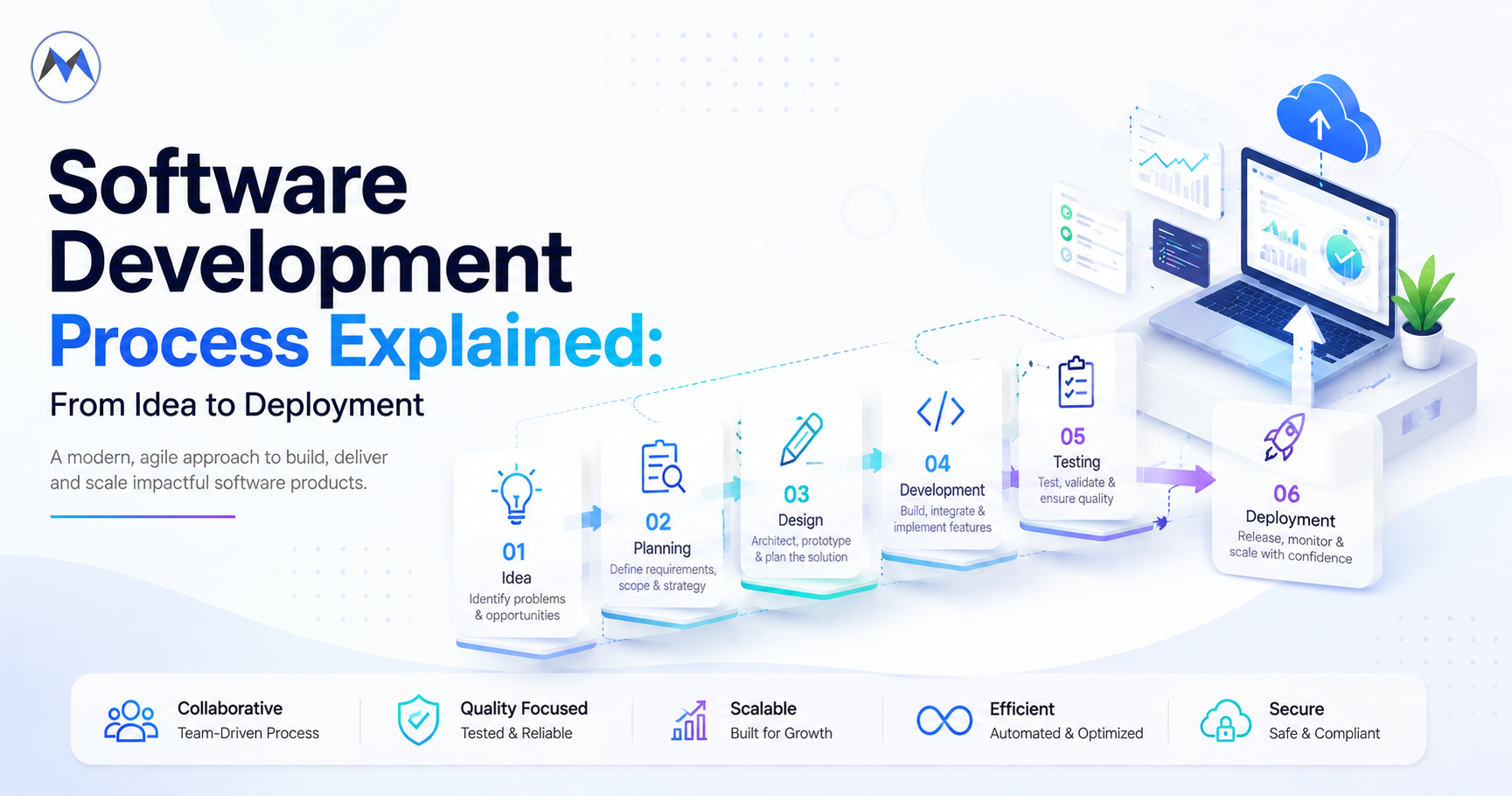
Learn the software development process from idea and planning to design, coding, testing, deployment, AI development, and ongoing maintenance.
Turning an idea into working software involves much more than writing code.
Behind every successful application is a series of decisions covering business requirements, user experience, architecture, development, testing, deployment, security, and ongoing improvement. The quality of this process can directly influence how quickly a product reaches users, how reliably it performs, and how easily it can evolve.
Whether you are building a customer-facing mobile application, an enterprise platform, a SaaS product, or an AI-powered solution, understanding the software development process helps businesses make better decisions before investing significant time and resources.
A structured development process also creates alignment between business teams, designers, developers, testers, and stakeholders.
This guide explains the major stages of software development, what happens during each stage, how modern development methodologies work, where AI fits into the process, common mistakes to avoid, and how to choose the right software development company for your project.
Software Development Process at a Glance
What is the software development process?
The software development process is the structured series of activities used to transform a business idea or problem into a working software product and continuously improve it after launch.
A typical process includes:
Idea → Discovery → Requirements → Planning → Design → Architecture → Development → Testing → Deployment → Maintenance
The exact sequence can vary depending on the project methodology, product complexity, team structure, and business requirements.
Modern software development is also increasingly iterative. Instead of completing every stage once and moving forward permanently, teams may repeatedly move between planning, development, testing, and improvement.
This makes it possible to respond to customer feedback and changing business requirements throughout the product lifecycle.
Why the Software Development Process Matters
A strong process helps answer important questions before and during development:
- What problem is the software solving?
- Who will use it?
- Which features are actually necessary?
- What technology should be used?
- How will the system scale?
- How will security be handled?
- How will the application be tested?
- How will it be deployed?
- How will user feedback influence future releases?
Without clear answers, development can become a sequence of disconnected tasks.
Teams may build features that users do not need, underestimate technical requirements, or discover important security and scalability issues late in the project.
A structured process reduces these risks by creating checkpoints throughout development.
Stage 0: Define the Problem Before Building
One of the most overlooked parts of software development happens before design and coding begin.
The first question should not be:
"What technology should we use?"
It should be:
"What problem are we trying to solve?"
A software product should have a clearly defined purpose.
For example, a business might want to:
- Automate manual processes
- Improve customer support
- Replace outdated internal software
- Create a new digital revenue stream
- Connect disconnected systems
- Provide customers with self-service capabilities
- Introduce AI-powered automation
Understanding the underlying problem helps determine what the software actually needs to accomplish.
Stage 1: Turn the Idea Into Requirements
Once the problem is clear, the next step is translating the idea into specific requirements.
Requirements describe what the product needs to do and the conditions under which it should operate.
Functional Requirements
These describe what the application should do. Examples:
- Users can create accounts
- Administrators can manage users
- Customers can make payments
- Users can upload documents
- The system can generate reports
Non-Functional Requirements
These describe how the application should perform. Examples:
- Security
- Performance
- Availability
- Scalability
- Accessibility
- Reliability
Both types matter. A product can have all the expected features and still fail if it is slow, unreliable, insecure, or difficult to use.
Identify the Right Users
Requirements should be connected to actual users. Different users may have different goals.
For example, an enterprise application could have:
- Employees
- Managers
- Administrators
- Customers
- External partners
Understanding these groups helps determine permissions, user journeys, features, interfaces, notifications, and reporting requirements. This prevents the development process from becoming purely technology-driven.
Stage 2: Decide What Belongs in the First Release
A common mistake is trying to build everything at once.
Instead, development teams often define an initial version containing the most important capabilities. This may be called an MVP (Minimum Viable Product).
The purpose is not to create an incomplete product. The purpose is to create a usable version that can validate assumptions with real users.
A first release might focus on:
- The core workflow
- Essential user accounts
- Critical business functionality
- Basic administration
- Necessary integrations
Additional functionality can then be prioritised based on user feedback and business results.
Prioritise Features Based on Business Value
Not every requested feature deserves the same development priority. Teams can evaluate features based on:
- User impact
- Business value
- Development effort
- Technical dependencies
- Risk
- Revenue potential
- Strategic importance
A useful prioritisation exercise asks: what must exist for the product to solve its primary problem? That question can prevent unnecessary development work.
Stage 3: Shape the Product Experience
Once requirements are understood, the next step is designing how users will interact with the software. UI/UX design can include:
- User flows
- Information architecture
- Wireframes
- Interface design
- Prototypes
- Responsive layouts
- Accessibility considerations
The goal is to make the software understandable before significant development effort is committed. For example:
User
  ↓
Login
  ↓
Dashboard
  ↓
Create Request
  ↓
Review
  ↓
Submit
  ↓
Confirmation
Mapping these journeys early can reveal missing requirements and unnecessary steps.
Design for Real User Behaviour
Good software is not simply a collection of features. Users should be able to understand:
- What to do next
- Where to find information
- What actions are available
- Whether an operation succeeded
- What to do when something fails
User experience should therefore be considered alongside technical development rather than treated as decoration added at the end.
Stage 4: Choose the Software Architecture
Once the product requirements and user experience are understood, the team can determine how the system should be structured.
Architecture decisions may cover frontend, backend, APIs, databases, authentication, file storage, caching, queues, external integrations, and cloud infrastructure.
The architecture should reflect the product's actual requirements. For example, a small internal business application may not require the same architecture as a globally distributed SaaS platform.
Select the Technology Stack
Technology selection can involve:
- Frontend: React, Next.js, Angular, Vue, or other appropriate frameworks
- Backend: Node.js, .NET, Java, Python, Go, or another suitable technology
- Database: PostgreSQL, MySQL, SQL Server, MongoDB, or another database depending on the application
- Infrastructure: cloud services, containers, managed databases, object storage, queues, monitoring, and deployment systems
The right stack depends on project requirements, existing systems, team expertise, expected scale, security, integration needs, and long-term maintenance. Technology should support the product rather than dictate it.
Stage 5: Start Software Development
Once the product has been planned and designed, developers begin implementation. Modern software development is commonly divided into smaller tasks and deliverables rather than attempting to build the entire application at once.
Development may involve frontend implementation, backend development, API development, database development, authentication, integrations, business logic, and automated tests. This applies equally to web application development and mobile app development.
A feature may move through a cycle such as:
Requirement → Design → Development → Testing → Review → Release
This allows teams to identify issues earlier.
Build in Small, Testable Pieces
Breaking software into manageable components makes it easier to review changes, test functionality, identify defects, track progress, release features, and adjust requirements.
For larger applications, modular development also reduces unnecessary dependencies between different parts of the system.
Version Control Is a Core Development Practice
Software teams typically use version-control systems to track changes. This allows developers to work on separate features, review code, track modifications, restore previous versions, and collaborate across teams.
Development workflows may include feature branches, pull requests, automated checks, and controlled merges. This creates a more predictable path from development to production.
Stage 6: Test the Application
Testing should not be postponed until the final days of development. Different types of software testing can be used throughout the software development process.
- Unit testing — tests individual functions or components
- Integration testing — checks whether different components work together correctly
- Functional testing — validates that features behave according to requirements
- Performance testing — examines application behaviour under expected or increased workloads
- Security testing — identifies potential vulnerabilities and weaknesses
- User acceptance testing — allows stakeholders or representative users to verify that the software meets business expectations
A mature testing strategy combines multiple approaches.
Test More Than the Happy Path
Applications should also be tested against unexpected situations. For example:
- Invalid input
- Missing information
- Expired sessions
- Network failures
- Duplicate requests
- Large files
- High traffic
- Permission violations
- External service failures
These cases often expose problems that normal feature testing misses.
Automate Repetitive Testing Where Practical
Automated tests can provide rapid feedback when developers modify existing functionality. A strong automated testing strategy can help detect regressions before they reach production.
Automation may cover unit tests, API tests, integration tests, UI tests, and build verification. The objective is not to automate everything regardless of cost. It is to automate repeatable checks that provide meaningful confidence.
Stage 7: Prepare for Production
Before deployment, the application needs to be prepared for its real operating environment. This can include production infrastructure, environment configuration, database setup, domain configuration, SSL/TLS, monitoring, logging, backup systems, security controls, and deployment automation.
Development environments should not simply be copied into production without considering operational requirements.
Security Should Be Considered Before Launch
Security should be part of the software development process rather than a final checklist. Important areas include:
- Authentication
- Authorization
- Data protection
- Secure API design
- Input validation
- Secrets management
- Dependency security
- Access controls
- Logging
- Infrastructure security
The appropriate security controls depend on the type of software and the sensitivity of its data. Enterprise applications may require additional governance and compliance considerations.
Stage 8: Deploy the Software
Deployment is the point where the application becomes available in its target environment. A deployment process may include:
Build → Test → Package → Deploy → Verify → Monitor
Modern teams often automate these steps through CI/CD pipelines. Automated deployment can help reduce manual errors and make releases more repeatable, particularly for cloud application development.
Deployment Strategies Can Reduce Risk
- Rolling deployment — new application instances are introduced gradually
- Blue-green deployment — two production environments are maintained so traffic can be switched between versions
- Canary release — a new version is initially released to a smaller group before broader deployment
- Feature flags — features can be enabled or disabled independently of the application deployment
The appropriate approach depends on the application's complexity and availability requirements.
Stage 9: Monitor What Happens After Launch
Deployment is not the end of software development. Once users start using the application, teams need to understand how it behaves in the real world.
Monitoring can track application errors, response times, server health, database performance, traffic, resource consumption, failed background jobs, and user activity.
Logs and metrics can help engineering teams identify problems before they become larger incidents.
Software Maintenance and Continuous Improvement
After launch, software typically enters an ongoing cycle:
Monitor → Learn → Improve → Test → Release
Maintenance can involve bug fixes, security updates, performance improvements, new features, dependency upgrades, infrastructure changes, and user experience improvements.
This is why software development should be viewed as a lifecycle rather than a one-time project.
Where AI Fits Into Modern Software Development
Artificial intelligence is changing both what software teams build and how software is developed.
AI development can be incorporated into applications through capabilities such as:
- AI assistants
- Intelligent search
- Document processing
- Recommendation systems
- Predictive analytics
- Automated workflows
- Natural language interfaces
- Content generation
- Customer support automation
AI can also support parts of the development process itself, including code assistance, test generation, documentation, debugging support, requirement analysis, and development automation.
However, AI-generated output still needs appropriate engineering review, testing, security validation, and human oversight.
What Does the AI Development Process Look Like?
AI software development introduces additional steps beyond traditional application development. A typical AI-enabled workflow can involve:
Business Problem → Data → AI Approach → Model/API Selection → Integration → Evaluation → Deployment → Monitoring
Teams may need to evaluate data quality, model capabilities, accuracy, latency, cost, privacy, security, and scalability.
For AI-powered products, these considerations should be included during architecture and planning rather than added after the application is already built.
Agile vs Waterfall: Which Development Method Is Better?
Waterfall
Waterfall generally follows a more sequential process.
Requirements → Design → Development → Testing → Deployment
It can be useful when requirements are stable and predictable.
Agile
Agile development uses shorter cycles and frequent feedback.
Plan → Build → Test → Review → Improve
Agile can be useful when requirements are expected to change.
Hybrid
Some organisations combine elements of both. For example, they may establish detailed requirements and architecture upfront while still using iterative development and releases.
There is no universally best methodology. The right approach depends on project complexity, regulatory requirements, customer involvement, requirement stability, team structure, and release expectations.
How Long Does Software Development Take?
There is no fixed timeline for software development. A project can take weeks, months, or significantly longer depending on its scope.
Factors include the number of features, number of platforms, design complexity, integrations, AI requirements, security requirements, team size, testing requirements, existing systems, and compliance needs.
A small business application may require a relatively short development cycle, while a complex enterprise platform can require a long-term development program.
A realistic estimate should be based on defined requirements rather than a generic timeline.
How Much Does Custom Software Development Cost?
The cost of custom software development depends on the product rather than simply the number of development hours.
Major cost factors can include product complexity, number of features, UI/UX requirements, platform count, backend architecture, integrations, AI functionality, security requirements, testing, cloud infrastructure, and ongoing maintenance.
For this reason, businesses should first establish the product scope and technical requirements before comparing development estimates.
Common Software Development Mistakes
Starting With Technology Instead of the Problem
Choosing a framework before understanding the business requirement can lead to unnecessary technical decisions.
Building Too Many Features
A large feature list does not automatically create a better product.
Treating Testing as the Final Step
Testing throughout development generally provides earlier feedback.
Ignoring Non-Functional Requirements
Performance, security, reliability, and scalability can be just as important as features.
Underestimating Integrations
Third-party systems can introduce unexpected technical dependencies.
Neglecting Deployment Planning
A product is not production-ready simply because it works on a developer's computer.
Ignoring Post-Launch Work
Software needs maintenance, monitoring, security updates, and continuous improvement.
Adding AI Without a Clear Use Case
AI should solve a meaningful problem rather than exist simply because it is technically possible.
How to Choose a Software Development Company
Choosing the right development partner can significantly influence the outcome of a software project. Before selecting a software development company, evaluate:
- Technical experience — does the team have experience with the technologies the project requires?
- Industry understanding — can the company understand the business problem rather than simply implement a feature list?
- Architecture capability — can the team design software that supports future requirements?
- Development process — is there a clear process for planning, development, testing, deployment, and communication?
- AI expertise — if AI is part of the product, does the team understand AI integration, data processing, model selection, and production deployment?
- Post-launch support — can the team maintain and improve the application after deployment?
- Communication — are requirements, progress, risks, and decisions communicated clearly?
A good development partner should function as a technology partner rather than simply a coding vendor.
How mTouch Labs Approaches Software Development
mTouch Labs works with businesses to transform product ideas and business requirements into digital applications and software solutions.
Depending on project requirements, software development services can include:
- Custom software development
- Web application development
- Mobile application development
- SaaS development
- API development
- Enterprise application development
- AI development
- AI-powered application development
- Cloud application development
- Third-party integrations
- UI/UX design
- Testing and quality assurance
- Deployment
- Maintenance and support
A project can begin with requirements and product discovery before moving through design, architecture, development, testing, and deployment.
For businesses introducing AI capabilities, the development process can also incorporate AI model integration, intelligent automation, data processing, and AI-powered workflows.
The objective is to create software around the business requirement rather than forcing every project into the same technical approach.
A Practical Software Development Lifecycle
A modern software project can be visualised as:
Business Idea
     ↓
 Discovery
     ↓
Requirements
     ↓
Prioritisation
     ↓
 UX / Design
     ↓
Architecture
     ↓
 Development
     ↓
   Testing
     ↓
 Deployment
     ↓
 Monitoring
     ↓
Improvement
     ↓
New Release
The important point is that the process does not necessarily end after deployment. Real-world software development is a continuous feedback loop.
Frequently Asked Questions
What are the main steps in the software development process?
The main steps typically include discovery, requirements gathering, planning, design, architecture, development, testing, deployment, monitoring, and maintenance. The exact process can vary depending on the project and development methodology.
What is the software development lifecycle?
The Software Development Life Cycle (SDLC) is a structured framework for planning, creating, testing, deploying, and maintaining software. It provides teams with a repeatable approach to software development.
How long does the software development process take?
The timeline depends on project scope, feature complexity, platforms, integrations, security requirements, AI functionality, team size, and testing needs. A reliable estimate requires understanding the project's actual requirements.
What is the difference between software development and software engineering?
Software development generally refers to the activities involved in creating and maintaining software. Software engineering applies broader engineering principles to areas such as architecture, reliability, scalability, testing, and maintainability.
What is custom software development?
Custom software development involves creating software specifically around the requirements of a business or organisation rather than relying entirely on an off-the-shelf product.
Where does AI fit into software development?
AI can be integrated into applications through assistants, recommendations, automation, document processing, intelligent search, predictive systems, and other capabilities. AI can also support development activities such as coding assistance, testing, and documentation.
What is the difference between Agile and Waterfall?
Waterfall generally follows a sequential development model, while Agile uses shorter iterative cycles with frequent feedback and adaptation. The appropriate approach depends on the project's requirements, constraints, and organisational environment.
Why is software testing important?
Testing helps identify functional defects, integration problems, performance issues, security weaknesses, and other problems before or after software reaches users. Testing throughout development can reduce the risk of costly late-stage defects.
What should I look for in a software development company?
Consider technical experience, industry understanding, development methodology, architecture capabilities, communication, testing practices, AI expertise where relevant, and post-launch support.
How can mTouch Labs help with software development?
mTouch Labs can support custom software development, web and mobile applications, SaaS products, APIs, cloud solutions, AI development, integrations, testing, deployment, maintenance, and ongoing product engineering.
Final Takeaway
The software development process is not simply a path from writing code to launching an application.
It is a continuous process of understanding a problem, defining requirements, designing an appropriate solution, building it carefully, validating the result, deploying it reliably, and improving it based on real-world feedback.
A successful project usually begins with clarity rather than technology. The most important stages are:
Define → Discover → Plan → Design → Build → Test → Deploy → Monitor → Improve
For modern applications, this process may also include AI development, cloud infrastructure, APIs, automation, analytics, and third-party integrations.
The right process does not eliminate every development challenge. Instead, it gives teams a structured way to identify risks early, make informed decisions, and continuously improve the product.
For businesses planning a new digital product, choosing an experienced software development company can help turn an initial idea into a scalable, maintainable solution while keeping technical and business goals aligned.
And as software continues to evolve, the strongest development process will be one that remains flexible enough to incorporate new technologies — including AI — without losing sight of the problem the product was built to solve.
Contact mTouch Labs to discuss your software development project, or request a free quote.
Frequently Asked Questions
What are the main steps in the software development process?
What is the software development lifecycle?
How long does the software development process take?
What is the difference between software development and software engineering?
What is custom software development?
Where does AI fit into software development?
What is the difference between Agile and Waterfall?
Why is software testing important?
What should I look for in a software development company?
How can mTouch Labs help with software development?
🎯 Key Takeaways
Learn the software development process from idea and planning to design, coding, testing, deployment, AI development, and ongoing maintenance.