




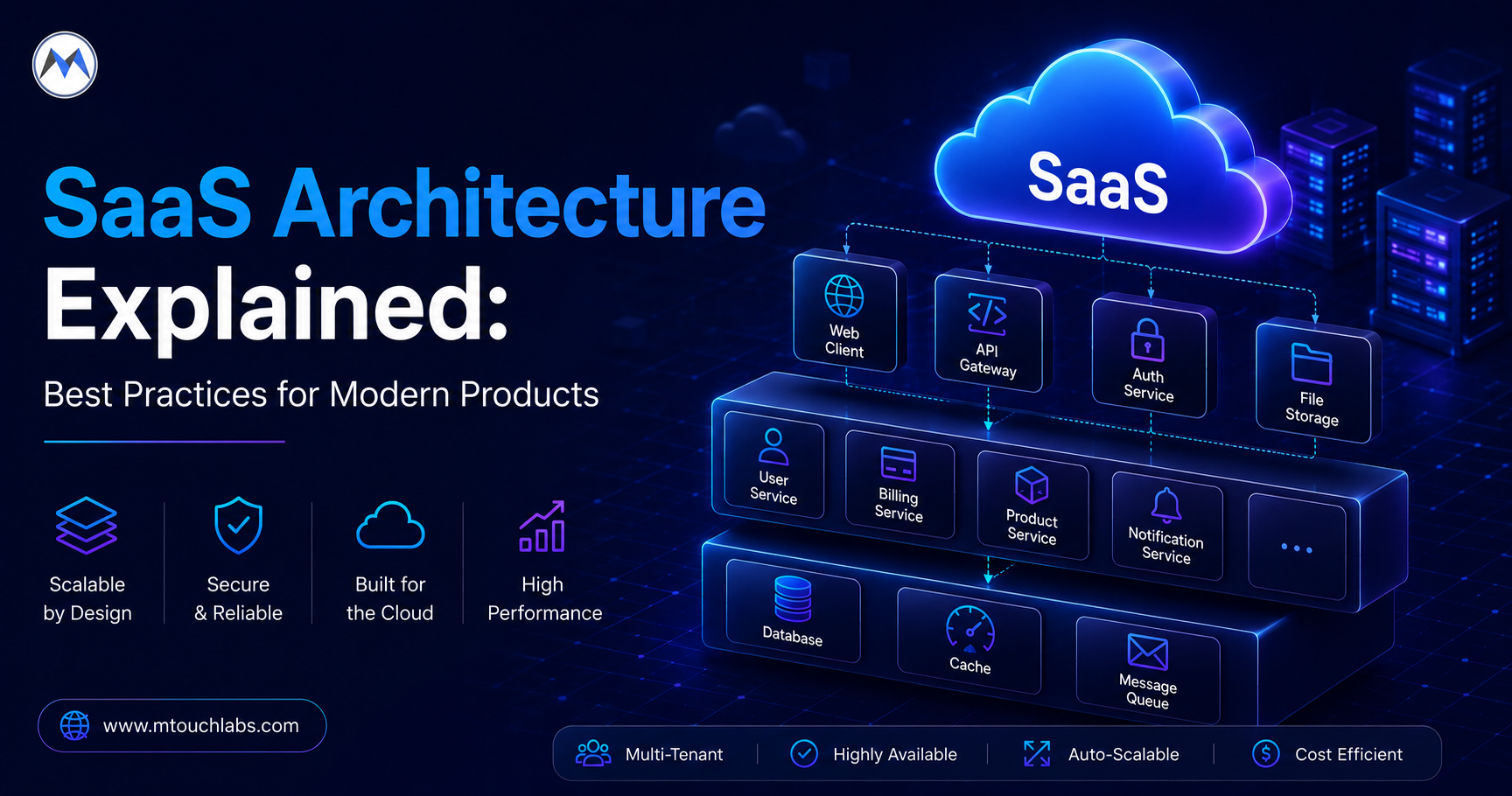
TL;DR — What You'll Learn
Explore SaaS architecture best practices for building scalable, secure products, including multi-tenancy, cloud infrastructure, AI integration, APIs, and software development.
Building a SaaS product is not simply about putting an application online and allowing customers to create accounts. Behind every reliable SaaS platform is an architecture that determines how users, data, integrations, security, infrastructure, and product features work together.
A well-planned SaaS architecture helps businesses support multiple customers, protect tenant data, manage growing workloads, introduce new features, and control infrastructure costs as the product scales.
The challenge is finding the right balance. Building too little can create technical limitations later, while building too much can make an early product unnecessarily expensive and complicated.
Modern SaaS platforms also increasingly incorporate artificial intelligence, automation, APIs, analytics, and third-party integrations. This means today's SaaS architecture needs to accommodate not only traditional application workloads but also AI-powered capabilities and data-intensive processes.
This guide explains how to approach SaaS application architecture, multi-tenancy, scalability, security, AI integration, infrastructure, and technology decisions when building modern software products.
What Is SaaS Architecture?
SaaS architecture is the technical structure used to deliver software to multiple customers through the internet while managing application functionality, customer data, authentication, integrations, security, infrastructure, and scalability.
Unlike traditional software that may be installed and operated independently by each customer, a SaaS product is typically operated centrally by the provider.
Customers access the application through a web browser, mobile application, API, or other interface.
A SaaS architecture therefore needs to answer several important questions:
- How will customers be separated?
- Where will tenant data be stored?
- How will users authenticate?
- How will permissions be managed?
- How will subscriptions control access to features?
- How will the platform handle increasing traffic?
- How will customer-specific configurations be maintained?
- How will integrations communicate with the product?
- How will the platform recover from failures?
- How will new versions be deployed safely?
These decisions form the foundation of the product.
Why SaaS Architecture Matters
Architecture decisions made early can influence development speed, infrastructure costs, security, and the ability to introduce new features.
A suitable architecture can help a SaaS product:
- Support increasing customer numbers
- Maintain tenant isolation
- Handle growing data volumes
- Improve application performance
- Introduce new integrations
- Support different subscription plans
- Add AI-powered capabilities
- Simplify deployment
- Improve monitoring
- Reduce unnecessary infrastructure costs
However, scalability doesn't mean preparing for millions of users before the first customer arrives.
The better approach is to create an architecture that supports current requirements while leaving room for controlled evolution.
Understanding the Building Blocks of a SaaS Product
A modern SaaS platform typically contains several interconnected layers.
User Experience
The web or mobile interface through which customers interact with the product.
Application Layer
Contains business workflows, rules, permissions, and application services.
API Layer
Provides communication between the frontend, backend, mobile applications, integrations, and external consumers.
Data Layer
Manages customer information, application records, transactions, configurations, and other persistent data.
Identity and Access Layer
Handles authentication, authorization, sessions, roles, and permissions.
Integration Layer
Connects the SaaS platform to external services, payment providers, enterprise systems, communication platforms, and other applications.
Infrastructure Layer
Provides hosting, computing, databases, storage, networking, deployment, monitoring, and operational services.
AI Layer
For AI-enabled products, this can include model APIs, AI workflows, vector databases, retrieval systems, inference processing, and AI-specific monitoring.
The architecture should define how these components communicate without unnecessarily coupling them.
The Most Important SaaS Architecture Decision: Multi-Tenancy
A tenant is typically a customer, organisation, business, account, or workspace using a SaaS platform.
Multi-tenancy allows multiple customers to use the same product while maintaining separation between their data and access.
There are several ways to implement this.
Shared Application and Shared Database
Multiple customers use the same application infrastructure and database. Customer records are associated with a tenant identifier.
Benefits:
- Lower infrastructure cost
- Efficient resource utilisation
- Simplified provisioning
- Centralised maintenance
- Easier platform-wide updates
Challenges:
- Strong tenant isolation is required
- Database queries must always respect tenant boundaries
- High usage from one tenant can affect others
- Backup and recovery need careful planning
This model can be effective for many SaaS products when tenant isolation is implemented correctly.
Shared Application With Separate Databases
The application infrastructure is shared, but each customer has an independent database.
Benefits:
- Stronger data separation
- Easier tenant-specific backup and recovery
- Useful for certain compliance requirements
Challenges:
- More infrastructure to manage
- Higher operational complexity
- Database provisioning becomes more involved
- Costs increase as customer numbers grow
This model can be useful when customers require stronger data separation without completely dedicated application infrastructure.
Dedicated Tenant Infrastructure
Each customer receives dedicated application or infrastructure resources.
Benefits:
- Strong isolation
- Greater infrastructure control
- Useful for demanding enterprise requirements
- Easier to apply customer-specific policies
Challenges:
- Higher cost
- More complex deployment
- Greater operational overhead
- Difficult to manage at very large tenant counts
This model is generally more appropriate for customers with specific security, compliance, performance, or contractual requirements.
How Do You Choose the Right Multi-Tenant Model?
There is no universal answer. The decision should consider:
- Customer type
- Expected number of tenants
- Data sensitivity
- Compliance requirements
- Performance expectations
- Infrastructure budget
- Customisation requirements
- Backup and recovery needs
- Operational capabilities
An important strategy is to avoid assuming that every customer needs the same infrastructure.
A SaaS platform can potentially use shared infrastructure for most customers while providing more isolated environments for enterprise accounts when justified.
Tenant Isolation Is a Core Security Requirement
Multi-tenancy creates a fundamental responsibility:
One customer must never be able to access another customer's data.
Tenant boundaries need to be enforced across the entire system, including:
- APIs
- Database queries
- Background jobs
- File storage
- Caches
- Search indexes
- Reports
- Exports
- Notifications
- Analytics
Frontend restrictions are not enough. The backend must independently verify that the authenticated user has permission to access the requested tenant and resource.
This is one reason tenant-aware architecture should be designed at the beginning of SaaS application development.
Design the Data Model for SaaS From the Start
The database structure should reflect the tenancy model. For example:
Tenant
 ├── Users
 ├── Projects
 ├── Documents
 ├── Orders
 ├── Settings
 └── Reports
Each relevant record needs a clear relationship to its tenant.
The architecture should also account for:
- Tenant creation
- Tenant deletion
- Data export
- Data retention
- Archiving
- Backup
- Restoration
- Tenant migration
As the number of customers grows, these operations can become just as important as normal application functionality.
Build a Strong Identity and Access Model
SaaS products frequently have more complicated identity requirements than simple consumer applications.
A user might belong to:
- One organisation
- Multiple organisations
- Multiple workspaces
- Several teams
- Different projects
The architecture should therefore distinguish between:
Identity → Organisation → Role → Permission → Resource
Authentication answers: Who is this user?
Authorization answers: What is this user allowed to access?
Keeping those concepts separate makes it easier to support enterprise access requirements.
Support Role-Based and Resource-Level Permissions
A SaaS application may include roles such as:
- Platform administrator
- Organisation administrator
- Manager
- Employee
- Viewer
- Billing administrator
But roles alone may not be enough. A manager could have access to one project but not another.
Therefore, the authorization model may need to combine roles with resource-level rules. This is particularly important for enterprise SaaS products with complex organisational structures.
Connect Subscription Plans With Product Entitlements
Most SaaS businesses eventually introduce subscription tiers, for example: Starter, Professional, Business, and Enterprise.
Different plans may control:
- User limits
- Storage
- Features
- API usage
- Automation
- Reports
- Integrations
- Support
Rather than scattering subscription checks throughout the codebase, define a clear relationship:
Subscription → Plan → Entitlements → Features
This makes pricing and feature changes easier to manage.
Don't Mix Billing Logic With Every Product Feature
Billing systems and product entitlements are related but should not become the same thing.
A payment platform may tell the application that a subscription is active. The SaaS application then determines which capabilities that customer can use.
This separation provides flexibility when:
- Pricing changes
- New plans are introduced
- Features become premium
- Trial periods change
- Enterprise contracts require custom entitlements
Make Customer Onboarding Repeatable
A SaaS platform should make it possible to onboard customers with minimal manual intervention. A typical workflow might be:
Sign Up → Tenant Creation → Account Setup → User Invitation → Subscription → Product Access
Provisioning may automatically create:
- Tenant records
- Default settings
- User roles
- Storage
- Permissions
- Initial configuration
Automation becomes increasingly important as the customer base grows.
Should You Start With Microservices?
Not necessarily. Microservices can be useful when a product has genuine requirements for independent services.
However, they also introduce:
- Distributed communication
- Service authentication
- Network failures
- Complex testing
- Multiple deployment pipelines
- Distributed tracing
- More infrastructure
- Operational overhead
For many early SaaS products, a modular monolith can be a more practical starting point.
Why Modular Architecture Can Work Well for SaaS
A modular monolith keeps the application relatively simple to deploy while maintaining clear internal boundaries. For example:
SaaS Application
│
├── Identity
├── Tenants
├── Users
├── Billing
├── Projects
├── Reporting
├── Notifications
└── Integrations
As the product grows, a heavily used module can potentially become an independent service. This approach allows architecture to evolve based on actual requirements.
When Should SaaS Products Move Toward Microservices?
Microservices may become appropriate when there are clear signals such as:
- Independent scaling requirements
- Large engineering teams
- Separate service ownership
- Different release schedules
- High-volume workloads
- Strong fault-isolation requirements
- Independent technology requirements
The decision should come from the product and operational needs rather than a desire to use a particular architecture trend.
Design a Stable API Layer
SaaS products frequently serve multiple consumers, including web applications, mobile apps, partner systems, customer integrations, internal applications, and automation tools.
A well-designed API layer creates a consistent boundary between consumers and backend services. It should address:
- Authentication
- Authorization
- Validation
- Error handling
- Versioning
- Rate limiting
- Documentation
For deeper API-specific guidance, see our related article on API development best practices for scalable applications.
Build Background Processing Into the Architecture
Some SaaS operations should not run inside a user's synchronous request. Examples include:
- Report generation
- Large file processing
- Data imports
- Email campaigns
- Notifications
- External data synchronisation
- AI processing
- Scheduled jobs
A queue-based architecture can separate these workloads:
User → API → Queue → Worker → Result
This prevents expensive operations from unnecessarily blocking user requests.
Design Notifications as Independent Workloads
A SaaS platform may send email, SMS, push notifications, in-app notifications, and webhooks.
Instead of making the core business transaction wait for each notification, notifications can be processed asynchronously. This also makes it easier to introduce additional communication channels later.
Handle Files Outside the Core Database When Appropriate
SaaS products may store documents, images, videos, reports, exports, and attachments.
Large files are often better handled through object storage rather than putting everything directly into a relational database.
The architecture should consider:
- Tenant ownership
- Access control
- Encryption
- File retention
- Download permissions
- Storage lifecycle
- Malware scanning where required
File URLs should not automatically expose sensitive customer data.
How to Build Scalable SaaS Architecture
Scalability involves more than adding servers. A SaaS platform needs to scale across several dimensions.
Application Scalability
Can additional application instances handle increased traffic?
Database Scalability
Can the database handle increasing queries and data volume?
Tenant Scalability
Can new customers be onboarded without excessive manual work?
Operational Scalability
Can the team monitor and maintain a larger platform?
Engineering Scalability
Can multiple developers and teams work on the product without excessive dependencies?
This broader view produces a more realistic approach to SaaS scalability.
Protect the Platform From Noisy Tenants
One customer may consume significantly more resources than another, for example through large imports, high-volume API calls, frequent reports, automated workflows, or large file processing.
Without appropriate controls, one tenant could affect others. Possible solutions include:
- Rate limits
- Usage quotas
- Queue prioritisation
- Per-tenant resource limits
- Workload isolation
- Dedicated infrastructure for high-volume customers
This is an important consideration when designing scalable multi-tenant SaaS architecture.
Use Horizontal Scaling Where It Makes Sense
A horizontally scalable application can distribute requests across multiple instances. This is easier when application instances are largely stateless.
Shared state can be handled through appropriate infrastructure such as databases, distributed caches, object storage, and message queues.
As traffic increases, application capacity can then be expanded without depending entirely on one server.
Use Caching Carefully in Multi-Tenant Systems
Caching can improve performance by reducing repeated processing and database access. Potential cache candidates include reference data, product configuration, frequently accessed settings, computed results, and public content.
But SaaS products need additional safeguards. Tenant-specific cache keys must prevent one customer's information from being returned to another customer.
Caching strategy should therefore account for tenancy, invalidation, freshness, and security.
Designing SaaS Architecture for AI-Powered Features
AI is increasingly becoming part of modern SaaS products. Examples include AI assistants, intelligent search, document analysis, content generation, recommendations, automated workflows, predictive analytics, and customer support automation.
However, adding AI to SaaS introduces architectural considerations that traditional applications may not have. An AI-enabled product may need to manage:
- AI model APIs
- Prompt processing
- User context
- Embeddings
- Vector databases
- Retrieval-augmented generation
- AI background jobs
- Token usage
- Model selection
- AI monitoring
- Sensitive data handling
A simple workflow could look like:
User → SaaS Application → AI Service → Model → Response
For resource-intensive operations:
User → Application → Queue → AI Worker → Model → Result
This allows AI workloads to be separated from the core application when necessary.
For companies investing in AI development, the AI layer should therefore be considered part of the overall product architecture rather than simply adding an AI API to an existing application.
This creates a natural connection between SaaS development, software development, and AI development.
Manage AI Costs and Usage
AI features can introduce usage-based infrastructure costs. A SaaS platform may need to track AI requests, tokens, model usage, processing time, customer-level consumption, and feature usage.
This can become particularly important when AI capabilities are included in subscription plans, for example:
Subscription → AI Entitlement → Usage Limit → AI Request → Usage Tracking
This gives the SaaS business better control over both functionality and costs.
Protect Customer Data When Using AI
AI features can process sensitive information. A SaaS architecture should therefore consider:
- What data is sent to external models?
- Where is that data processed?
- How long is it retained?
- Is customer information included in prompts?
- How is tenant separation maintained?
- Who can access AI-generated outputs?
For enterprise applications, these considerations can become central to AI adoption.
SaaS Security Must Cover More Than Authentication
Security should span the entire product, including authentication, authorization, tenant isolation, API security, database security, file storage, secrets, infrastructure, integrations, logging, and deployment pipelines.
Depending on the application, security controls may include:
- Encryption
- Strong authentication
- Role-based access
- Input validation
- Rate limiting
- Secure secret management
- Dependency security
- Security testing
- Audit logs
Security should be designed into the architecture rather than added after development.
Add Audit Logging for Enterprise SaaS
Enterprise customers may need visibility into important activities. They may ask who changed a record, when it was changed, who changed a user's permissions, who accessed a sensitive resource, or which administrator changed a configuration.
An audit-log system can record the user, tenant, action, resource, timestamp, request or trace ID, and relevant context.
Audit data should itself be protected from unauthorised modification.
Observability Becomes Essential as SaaS Grows
A growing SaaS platform can have thousands of users and many independent workloads. When something goes wrong, engineering teams need to determine which tenant was affected, which component failed, how many customers are impacted, when the issue began, and whether the problem is isolated.
Useful observability signals include logs, metrics, traces, error rates, response times, queue depth, database performance, and infrastructure health.
Tenant-aware observability can help with troubleshooting while still protecting customer information.
Build a Deployment Strategy for Continuous Releases
SaaS products are continuously updated. A deployment strategy should reduce unnecessary disruption.
Depending on requirements, teams may use automated CI/CD, rolling deployments, blue-green deployments, canary releases, and feature flags.
Feature flags can also allow a new capability to be released gradually to selected customers. This can be useful when introducing major product changes or AI features.
Treat Database Migrations as Part of Product Architecture
Database changes become more complex as a SaaS platform grows. A migration may affect existing customers, large datasets, active users, background jobs, and older application versions.
A safer approach may involve phased changes:
Compatible Schema → Application Update → Data Migration → Legacy Removal
The exact approach depends on the migration, but database changes should be planned alongside application releases.
Plan Backup and Disaster Recovery
A SaaS business needs more than routine backups. Consider backup frequency, retention, recovery objectives, restore testing, geographic redundancy, tenant-level recovery, and disaster scenarios.
Most importantly, recovery procedures should actually be tested. A backup that cannot be restored when needed provides limited protection.
Support Data Portability
Customers may eventually need to export their data, integrate with another system, download reports, migrate to another platform, or close their account.
Data portability should therefore be considered during architecture design. Structured export capabilities can also simplify integrations and customer migrations.
Allow Enterprise Customisation Without Creating Separate Products
Enterprise customers often request custom functionality such as SSO, custom workflows, additional integrations, advanced permissions, branding, or custom reports.
Creating a separate codebase for every customer can become difficult to maintain. Instead, where practical, use feature flags, tenant configuration, permission models, configurable workflows, and extension points.
This keeps the underlying product maintainable while supporting meaningful customer differences.
Choosing a SaaS Technology Stack
There is no universal technology stack for SaaS development. The right choice depends on product requirements, developer expertise, expected traffic, security requirements, integrations, hosting options, hiring availability, and long-term maintenance.
Frontend
React, Next.js, Angular, Vue, or another suitable framework.
Backend
Node.js, .NET, Java, Python, Go, or another appropriate technology.
Database
PostgreSQL, MySQL, SQL Server, MongoDB, or another suitable data platform.
Infrastructure
Cloud hosting, containers, managed databases, object storage, queues, monitoring, and CI/CD.
The important principle is: choose technologies based on product requirements rather than choosing requirements to justify a technology.
Software Development Strategy for SaaS Products
Architecture and software development should evolve together. A strong development approach can include:
- Product and technical discovery
- Architecture planning
- MVP development
- Automated testing
- Cloud deployment
- Monitoring
- Customer feedback
- Incremental improvement
This avoids spending months building infrastructure that may not be needed.
For early-stage products, the emphasis may be on validating the product efficiently. For established platforms, the focus may shift toward performance, reliability, integrations, security, and enterprise capabilities.
Common SaaS Architecture Mistakes
Overengineering Too Early
Building a complex distributed system before product validation can increase cost and slow development.
Ignoring Tenant Isolation
Tenant separation should be treated as a core architectural requirement.
Turning Everything Into a Microservice
Microservices are useful when justified, but unnecessary service boundaries increase operational complexity.
Mixing Subscription Rules Throughout the Application
Plan entitlements should have clear ownership.
Running Heavy Workloads Synchronously
Large imports, reports, and AI processing can overload the primary application.
Treating Security as Login Protection
Authentication is only one part of application security.
Ignoring Data Portability
Customers may eventually need to export or migrate their information.
Creating Customer-Specific Codebases
Excessive customisation can turn one SaaS product into several difficult-to-maintain products.
A Practical SaaS Architecture Blueprint
A conceptual modern SaaS platform might look like this:
                    Customers
                        │
               Web / Mobile Clients
                        │
                  Edge / CDN
                        │
                  API Gateway
                        │
        ┌───────────────┴───────────────┐
        │                               │
   SaaS Application                Identity
        │                               │
   ┌────┼────────────┐                  │
   │    │            │                  │
Tenant Billing    Business Logic   Authorization
   │    │            │
   └────┼────────────┘
        │
   ┌────┴───────────┐
   │                │
Database        Message Queue
   │                │
   │              Workers
   │                │
   └──────┬─────────┘
          │
     Object Storage
          │
   ┌──────┴─────────┐
   │                │
Monitoring       AI Services
This is a conceptual model rather than a universal architecture. The actual implementation should reflect the product's requirements, customer model, scale, security needs, and development capabilities.
How SaaS Architecture Can Evolve
A SaaS product doesn't need to start with its final architecture.
Early Stage
Focus on modular application design, a clear tenant model, a managed database, basic authentication, automated deployment, and essential monitoring.
Growth Stage
Introduce background workers, queues, caching, better observability, stronger tenant controls, and performance optimisation.
Scale Stage
Consider horizontal scaling, database optimisation, workload isolation, advanced deployment strategies, and dedicated resources where justified.
Enterprise Stage
Add capabilities such as SSO, advanced auditing, enterprise permissions, dedicated infrastructure options, compliance capabilities, and advanced integrations.
The best SaaS architecture is therefore evolutionary.
SaaS Architecture Best Practices Checklist
Before launching or scaling a SaaS product, review the following.
Architecture
- Is the tenant model clearly defined?
- Are application modules separated logically?
- Is the architecture unnecessarily complex?
- Can the product evolve without major rewrites?
Security
- Is authentication secure?
- Is authorization enforced server-side?
- Is tenant isolation consistently applied?
- Are sensitive operations audited?
Data
- Is customer data structured appropriately?
- Are backups tested?
- Is data export supported?
- Can the platform handle growing datasets?
Scalability
- Can application capacity increase horizontally?
- Are heavy workloads asynchronous?
- Are database bottlenecks monitored?
- Can noisy tenants be controlled?
AI
- Is AI usage isolated appropriately?
- Are AI costs tracked?
- Are AI features tenant-aware?
- Is customer data protected during AI processing?
Operations
- Are logs and metrics available?
- Is tracing available where required?
- Can deployments be performed safely?
- Is disaster recovery documented and tested?
SaaS, Software, and AI Development With mTouch Labs
mTouch Labs can support businesses building SaaS platforms and modern digital products through software development, application architecture, AI development, integrations, and ongoing product engineering.
Depending on project requirements, development can include:
- SaaS application development
- Custom software development
- AI development
- AI-powered application development
- Web application development
- Mobile app development
- API development
- Cloud application development
- Database architecture
- Third-party integrations
- Authentication and authorization
- Subscription and billing integration
- Performance optimisation
- Testing and deployment
- Product maintenance
For SaaS businesses, the architecture can be designed around multi-tenancy, security, scalability, integrations, subscription management, and future product growth.
For AI-enabled products, the architecture can also accommodate AI models, intelligent automation, data processing, AI workflows, and AI-powered user experiences.
The appropriate approach depends on the product's stage, target customers, expected usage, security requirements, and long-term roadmap.
Final Thoughts
A successful SaaS product needs more than a functional application.
It needs an architecture that can manage customers, data, security, integrations, workloads, subscriptions, deployments, and future growth without introducing unnecessary complexity.
For an early product, that may mean starting with a modular architecture and managed infrastructure.
As the product grows, it may require background processing, caching, advanced observability, workload isolation, stronger tenant controls, and independently scalable services.
And as AI becomes part of modern software products, SaaS architecture increasingly needs to account for model integrations, AI workloads, usage management, data protection, and intelligent automation.
The goal isn't to build the most complicated architecture.
The goal is to build the right architecture for the product today while creating a foundation that can support the business tomorrow.
For businesses planning a new SaaS platform, modernising an existing product, or adding AI capabilities to software, thoughtful architecture can make the difference between a product that becomes increasingly difficult to maintain and one that can evolve with its customers.
Contact mTouch Labs to discuss your SaaS architecture, or request a free quote.
Frequently Asked Questions
What is SaaS architecture?
What is multi-tenant SaaS architecture?
What is the best architecture for a SaaS application?
What is the difference between single-tenant and multi-tenant SaaS?
How does SaaS architecture support scalability?
How do you secure a multi-tenant SaaS application?
Should a SaaS application use microservices?
How can AI be integrated into SaaS applications?
What is AI-powered SaaS development?
What technology stack is best for SaaS development?
How can a software development company help build a SaaS product?
How can mTouch Labs help with SaaS and AI development?
🎯 Key Takeaways
Explore SaaS architecture best practices for building scalable, secure products, including multi-tenancy, cloud infrastructure, AI integration, APIs, and software development.