

Businesses are looking for more ways to boost productivity, cut down on repetitive tasks, and get more value from the data they already have. Traditional automation has helped organizations streamline routine tasks, but many business processes still require understanding information, making decisions and coordinating actions across different systems.
That’s where AI agents are coming in handy.
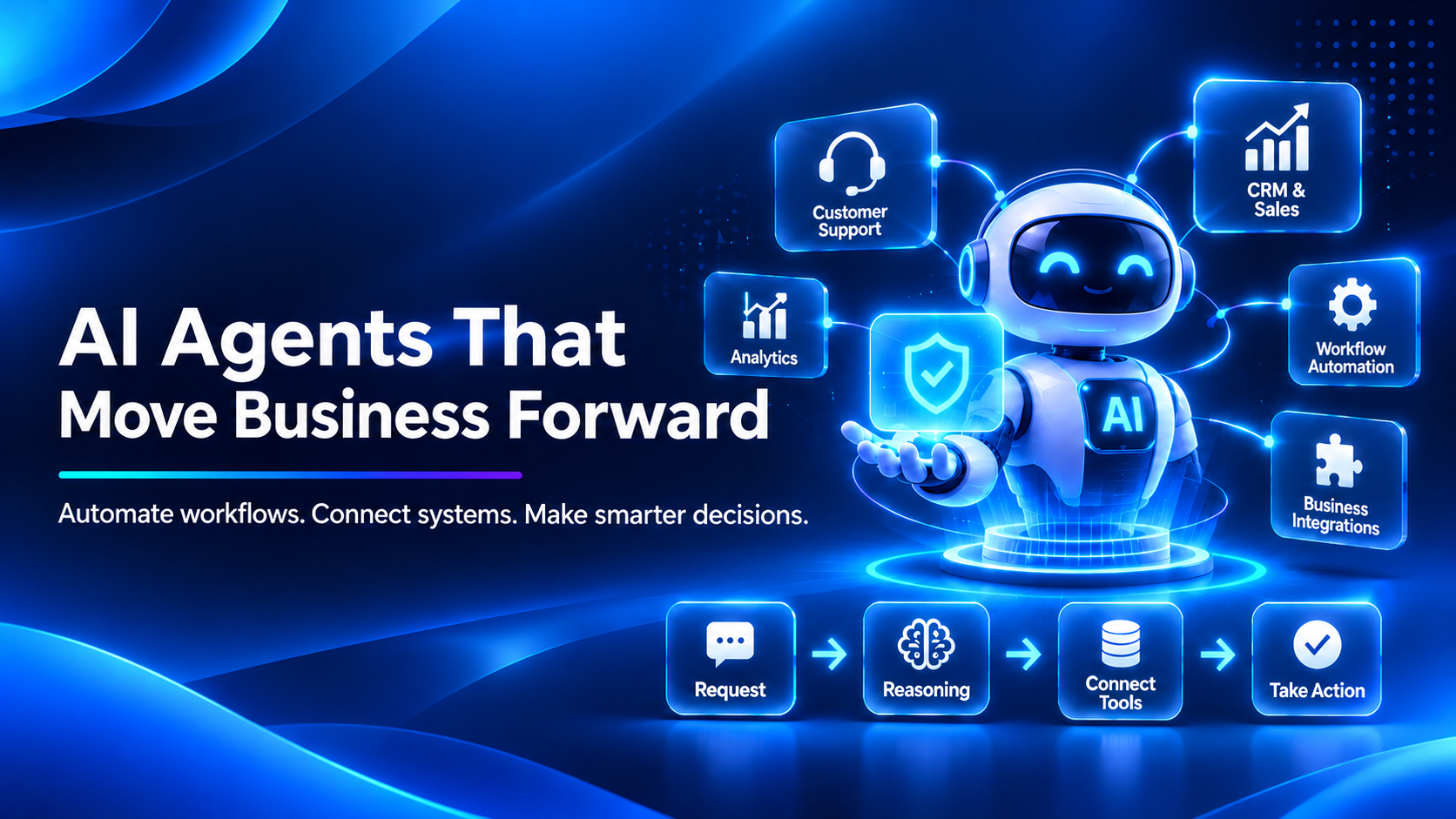
Traditional chatbots are mostly built to respond to user questions. AI agents, in contrast, can understand a goal, decompose it into smaller tasks, find relevant information, interact with connected applications and perform specific actions with defined permissions.
For organizations thinking about AI adoption, the opportunity is more than adding another chatbot to their website. The real value is in identifying business processes where intelligent automation can save time, improve service quality and support better decision-making.
In this guide we look at how AI agent development works, the business applications, architecture, development process, implementation costs and the key considerations that businesses should understand before adopting AI agents.
What Is AI Agent Development?
The development of AI agents is the process of designing, building and deploying intelligent software systems that can understand instructions, analyze information, make decisions and execute tasks to achieve specific objectives.
In general, an AI agent uses a large language model (LLM) as its brain. It can also link to external tools, databases, APIs, enterprise applications and knowledge sources to get things done.
For example, consider an eCommerce company receiving hundreds of customer enquiries every day. A traditional chatbot might provide answers based on predefined questions and responses. An AI-powered customer support agent can do more.
It could:
-
Understand a customer's issue using natural language.
-
Retrieve the customer's order information.
-
Check the latest delivery status through an integrated system.
-
Identify whether the order is delayed.
-
Explain the situation to the customer.
-
Create a support ticket when additional assistance is required.
-
Escalate sensitive or complicated cases to a human representative.
The agent does not simply generate a response. It uses available information and connected tools to move a task towards completion.
The level of autonomy depends on how the system is designed. Some agents only recommend actions, while others can execute approved operations independently within specific permissions.
How Do AI Agents Work?
AI agents operate via a mix of language models, instructions, external tools, business data and workflow orchestration.
The implementation depends on the business requirement but most of the AI agents systems follow a similar process.
1. Understanding the User's Request
The agent first receives an instruction or business request. It analyses the input to understand the user's intention and the outcome they expect.
For example, a sales manager might ask:
"Find all the new leads from this week, identify the high-priority prospects and prepare a follow-up list."
The agent interprets the request and determines which information and actions are needed.
2. Planning the Required Actions
After understanding the request, the agent breaks the task into smaller steps.
In this example, it may need to:
-
Access the CRM system.
-
Retrieve leads created during the selected period.
-
Review available lead information.
-
Apply predefined qualification criteria.
-
Organise the prospects by priority.
-
Prepare a follow-up list.
This planning process allows the agent to handle tasks that involve multiple operations.
3. Retrieving Relevant Information
An AI agent may need access to internal company information before completing a task.
This information can come from:
-
Business databases.
-
CRM and ERP platforms.
-
Internal documents.
-
Product catalogues.
-
Knowledge management systems.
-
External APIs.
-
Customer records.
RAG, or Retrieval-Augmented Generation, enables agents to fetch pertinent details from business knowledge bases prior to crafting their replies.
This is particularly useful when an organization requires answers from its own documents, policies, product information, or operational data.
4. Using Tools and Integrations
One of the most important capabilities of AI agents is tool integration.
An agent can be connected to authorised tools that allow it to interact with existing business applications.
For example, integrations may include:
-
CRM platforms for customer and sales information.
-
ERP systems for inventory and operational data.
-
Payment gateways for transaction-related workflows.
-
Communication platforms for notifications.
-
Project management applications for task updates.
-
Internal APIs for business-specific operations.
The available tools determine what an agent can actually do beyond generating text.
5. Executing and Reviewing Actions
When the information is ready, the agent executes allowed actions and tests the effects.
For instance, it could pull an order, close a support ticket or generate a sales report.
For critical tasks, like initiating a refund, authorising payments, or editing key business records, a human approval may be needed prior to execution.
And this can assist organisations to bring automation and accountability.
AI Agents vs AI Chatbots vs Traditional Automation
AI agents, AI chatbots and traditional automation are related technologies, but they serve different purposes.
Understanding the differences helps businesses choose the right solution for their requirements.
|
Feature |
Traditional Automation |
AI Chatbots |
AI Agents |
|
Main purpose |
Execute predefined workflows |
Answer user questions |
Complete goal-oriented tasks |
|
Decision-making |
Rule-based |
Primarily response generation |
Context-based reasoning and planning |
|
Workflow |
Fixed steps |
Mostly conversational |
Can coordinate multiple steps |
|
External integrations |
Yes |
Possible |
Yes, often central to functionality |
|
Adaptability |
Limited to configured rules |
Understands natural language |
Can adapt task execution within defined boundaries |
|
Autonomy |
Rule-dependent |
Usually limited |
Configurable |
|
Best suited for |
Repetitive structured tasks |
Customer interactions and information retrieval |
Complex, multi-step business workflows |
When Should a Business Choose an AI Agent?
An AI agent is worth considering when a process requires more than a simple response or a fixed sequence of actions.
For example:
-
A chatbot can answer questions about product availability.
-
An AI agent can check inventory, identify suitable alternatives and prepare an order for approval.
-
Traditional automation can send an invoice reminder on a scheduled date.
-
An AI agent can review payment information, identify overdue accounts and prepare appropriate follow-up actions.
However, not every business process needs an AI agent. If a workflow is predictable and follows fixed rules, traditional automation may be simpler, more reliable and less expensive.
The right approach depends on the complexity of the task, the available data, the expected level of autonomy and the business value.
10 Practical AI Agent Use Cases Across Industries
AI agents can support different departments and industries depending on their objectives, available information and system integrations.
Here are some practical applications.
1. AI Agents for Customer Support
Customer support teams get many repetitive customer requests for orders, payments, account information, service calls and products.
The customer support software agent powered by AI can comprehend customer questions and generate useful responses, find appropriate information, and initiate authorized actions via connected systems.
Providing the assistant with data from the order management system on the status of the delivery allowing the agent to inform the customer when an order is running late.
More complex enquiries can be escalated to human support agents with the conversation context.
2. AI Agents for Sales and Lead Management
Sales teams spend considerable time researching prospects, updating CRM records and preparing follow-up communications.
AI agents can assist with these activities by:
-
Collecting information from approved lead sources.
-
Organising prospects based on predefined criteria.
-
Summarising customer interactions.
-
Updating CRM records.
-
Preparing personalised follow-up drafts.
-
Reminding sales representatives about pending activities.
This helps sales teams spend more time on conversations and relationship building rather than repetitive administrative work.
3. AI Agents for Healthcare
Healthcare organisations manage appointments, patient enquiries, administrative information and internal coordination.
AI agents can support non-clinical workflows such as:
-
Appointment scheduling and reminders.
-
Answering general questions about hospital services.
-
Retrieving approved patient information.
-
Coordinating administrative requests.
-
Managing routine communication.
Healthcare implementations require strict privacy, security and access controls. AI agents should not independently make clinical decisions or replace qualified medical professionals.
4. AI Agents for eCommerce Businesses
Online retailers manage product enquiries, order tracking, returns, inventory and customer communication.
AI agents can connect with eCommerce platforms to support several of these activities.
Common applications include:
-
Product discovery and recommendations.
-
Order status enquiries.
-
Return and exchange assistance.
-
Inventory information retrieval.
-
Customer support automation.
-
Personalised shopping assistance.
For example, an AI shopping assistant can understand a customer's requirements, compare available products and recommend suitable options based on product information.
5. AI Agents for Financial Services
Financial organisations deal with large volumes of information, customer enquiries and document-based processes.
AI agents can assist with administrative and information-related workflows such as:
-
Retrieving financial policy information.
-
Organising customer documentation.
-
Supporting internal compliance research.
-
Summarising financial reports.
-
Routing service requests.
-
Identifying records that require human review.
Financial decisions, transactions and regulatory approvals should remain subject to appropriate controls and authorised human oversight.
6. AI Agents for Human Resources
HR teams often face questions from employees about employee leave policies, onboarding, benefits, corporate policies, procedures, and FAQs.
Employees can connect to a sales, marketing or HR AI agent in a knowledge base. An agent in your knowledge base can assist employees to get relevant information immediately instead of waiting for a human reply.
It can also support:
-
Employee onboarding coordination.
-
Interview scheduling.
-
Document collection reminders.
-
HR policy information retrieval.
-
Internal request management.
Sensitive employment decisions should remain under human supervision.
7. AI Agents for Logistics and Supply Chain
Logistics companies help in co-ordinating deliveries, delivery timings, and inventory as well as communication with suppliers.
AI agents to access shipment details, track down late deliveries, combine news about the supply chain and initiate day-to-day alerts.
For instance, the agent might flag shipments lacking a status update to create a report for the operations team to review.
8. AI Agents for IT Service Management
IT departments receive frequent requests involving password issues, software access, troubleshooting and system incidents.
AI agents can assist with:
-
Classifying IT support requests.
-
Retrieving troubleshooting instructions.
-
Checking system status through approved integrations.
-
Creating service desk tickets.
-
Recommending possible solutions.
-
Escalating unresolved incidents.
For security-sensitive activities, permissions and approval workflows must be clearly defined.
9. AI Agents for Marketing Teams
Marketing teams work with campaign information, audience research, performance reports and content workflows.
AI agents can support these activities by:
-
Collecting campaign performance data.
-
Summarising marketing reports.
-
Researching target audiences.
-
Organising content ideas.
-
Preparing campaign briefs.
-
Identifying unusual performance changes for review.
An agent can also connect to analytics and marketing platforms to retrieve information, provided the necessary integrations and permissions are available.
10. AI Agents for Real Estate
Real estate companies handle property enquiries, customer information, appointment scheduling and property listings.
An AI real estate agent can assist with:
-
Responding to property enquiries.
-
Finding listings based on customer requirements.
-
Sharing approved property details.
-
Scheduling property visits.
-
Organising prospective buyer information.
-
Preparing follow-up communications.
This can help property teams manage enquiries more efficiently while allowing agents to focus on negotiations and customer relationships.
AI Agent Architecture: What Goes Into an AI Agent System?
AI agent architecture explains how components collaborate to process requests, to retrieve data, to make decisions, to perform tasks, and more.
The solution is dependent on the nature of the application and business needs.
The main components generally include the following.
1. User Interface
The user interface provides a way for employees, customers or administrators to interact with the AI agent.
It could be integrated into:
-
A website.
-
A mobile application.
-
An internal business dashboard.
-
A customer support portal.
-
An enterprise communication platform.
The interface should make it clear what the agent can do and when human assistance is available.
2. Large Language Model (LLM)
LLM constitutes the reasoning module of our system.
It can understand natural language, comprehend context, and assist with task planning and identifying the appropriate tools that may be needed among all the available options.
The model can be selected based on the requirements of precision, delay, cost, data and the complexity of the task required.
3. Agent Orchestration Layer
The orchestration layer manages how the agent processes requests and coordinates its operations.
It can handle:
-
Task planning.
-
Tool selection.
-
Workflow execution.
-
Agent coordination.
-
Error handling.
-
State management.
For complex applications, orchestration helps organise several specialised agents or services.
4. Knowledge Base and RAG
Data base of a business relevant information can be retrieved.
Using RAG, an AI application can search authorized sources for information and take that information as context.
Typical RAG implementation might include - Document processing - Embedding - Vector database - Retrieval logic and response generation
Good if your organisations needs their agents to use content from systems and knowledge bases, product information and policies.
5. APIs and External Integrations
APIs allow AI agents to communicate with existing business applications and services.
For example, a customer support agent may connect with:
-
CRM software.
-
Order management systems.
-
Payment services.
-
Inventory databases.
-
Ticketing platforms.
Integrations should use authenticated connections and clearly defined permissions.
6. Memory and Context Management
Memory and context management enable agents to hold onto information across an interaction or procedure.
For instance, if an agent is responding to a customer request, they might be required to hold onto the earlier communications from the customer and whatever has already been fetched.
Memory should be minimized to prevent it from recording unwated data.
7. Security and Monitoring
Security and monitoring are essential parts of production AI agent architecture.
They help organisations control access, track actions, investigate errors and evaluate system performance.
Important considerations include:
-
Authentication and authorisation.
-
Role-based access control.
-
Data encryption.
-
API security.
-
Activity logging.
-
Rate limiting.
-
Human approval workflows.
-
Output validation.
-
Performance monitoring.
A reliable AI agent should not have unrestricted access to company systems or data.
How to Develop an AI Agent for Your Business: Step-by-Step Process
Building an AI agent requires more than choosing an AI model and connecting it to an application.
A successful implementation starts with understanding the business problem and designing a solution around it.
Step 1: Business Issue in Focus
Identify the process to improve.
Seek out activities with a high volume of repetitive data retrieval or input, or that take time to coordinate for each use.
For instance a company may be answering the same customer enquiries all day.
Rather than jumping straight to creating an AI agent, analyze the workflow and see which tasks can be automated with full confidence.
Step 2: Define the Agent's Responsibilities
Once the use case is identified, define exactly what the agent should and should not do.
Consider:
-
What tasks should it complete?
-
Which information can it access?
-
Which applications can it interact with?
-
What decisions can it make?
-
When should it request human approval?
-
Under what conditions should it escalate a task?
Clearly defined responsibilities help prevent unexpected actions.
Step 3: Prepare Business Data
AI agents need reliable information to produce useful results.
Depending on the application, data preparation may involve collecting and organising:
-
Company documents.
-
Product information.
-
Customer records.
-
Business policies.
-
Knowledge base articles.
-
Database records.
-
API documentation.
Data quality, access permissions and information freshness should be considered before integration.
Step 4: Select the Right AI Model and Technology
Choose an appropriate AI model and supporting technology based on the requirements.
The selection process should consider:
-
Reasoning capabilities.
-
Tool-calling support.
-
Response quality.
-
Processing speed.
-
Infrastructure requirements.
-
Data privacy.
-
Integration options.
-
Operating costs.
There is no single technology stack suitable for every AI agent project.
Step 5: Design the Architecture and Integrations
Design the technical architecture before scaling up to full production.
This covers the development of user interfaces, model linkages, orchestration logic, knowledge sources, databases, APIs and security requirements.
Begin with the simplest architecture that can perform the task you need reliably.
One-agent might be enough for a first use case. Multiple specialised agents can be added if they are indeed needed by the workflow.
Step 6: Develop and Configure the Agent
The development team develops the main part of an agent.
This includes setting up instructions, tool integrations, workflow logic, connecting business systems, and how to enable the agent to handle incompletes and failures.
System must also have restrictions over tool use, execution time and repetitive action.
Step 7: Test and Evaluate Performance
Testing should cover more than whether the agent produces a good-looking response.
Evaluate whether it:
-
Understands user requests correctly.
-
Retrieves accurate information.
-
Selects the appropriate tools.
-
Executes permitted actions.
-
Handles unexpected inputs.
-
Responds safely to unauthorised requests.
-
Escalates tasks when necessary.
Test the agent using realistic business scenarios before making it available to users.
Step 8: Deploy, Monitor and Improve
Once you have validated it, run your AI agent in your business environment.
Keep an eye on how it is performing by measuring its accuracy, task success, response times, operational expenses and user satisfaction.
Use this knowledge to enhance prompts, integrations, retrieval quality, and flow logic.
AI agent and not on the one-off delivery of software.
How Much Does AI Agent Development Cost?
AI agent will vary depending on how much it needs to do, the technical architecture and integrations of the project, and the operational requirements.
Depending on the scope of the application, a simple agent answering questions using a small knowledge base is likely to be easier to develop compared to an enterprise AI agent which interacts with multiple business systems and performs multi-step workflows.
Compeny's should be analysing the key variables that affect the costs of development rather than the working assumption for every project of that they will have a fixed price.
Factors That Affect AI Agent Development Costs
1. Complexity of the Use Case
A simple information retrieval agent is less complex than an agent that needs to analyse multiple data sources, make decisions and coordinate several operations.
2. AI Model Selection
Different AI models have different pricing structures, capabilities and infrastructure requirements. Model usage, token consumption and the number of requests can influence ongoing expenses.
3. Data Integration
Connecting the agent to existing CRM, ERP, HR, inventory or financial systems can increase development time depending on API availability and system complexity.
4. RAG and Knowledge Base Requirements
If the agent needs to retrieve information from large document collections, additional work may be required for data processing, embedding generation, vector storage and retrieval optimisation.
5. Security and Compliance
Enterprise applications may require additional authentication, access controls, encryption, auditing, data governance and approval mechanisms.
6. Deployment and Maintenance
Infrastructure, monitoring, model updates, performance optimisation and ongoing support contribute to the overall cost of ownership.
How to Estimate an AI Agent Development Budget
A practical way to estimate the budget is to divide the project into different stages:
|
Development stage |
Work involved |
|
Discovery and planning |
Requirements, use case identification and feasibility |
|
Architecture and design |
Technology selection and system architecture |
|
AI development |
Model integration, prompts and agent logic |
|
Data integration |
RAG, databases and external APIs |
|
Application development |
User interface and backend functionality |
|
Testing |
Functional, performance and security testing |
|
Deployment |
Infrastructure configuration and production release |
|
Maintenance |
Monitoring, improvements and technical support |
For an accurate estimate, businesses should request a project assessment based on their workflows, integrations, expected usage and security requirements.
Common Challenges in AI Agent Development
AI agents offer useful capabilities, but implementing them in real business environments also introduces technical and operational challenges.
Understanding these challenges early can help organisations avoid unnecessary complexity.
1. Inaccurate or Incomplete Responses
AI models can sometimes generate incorrect information or misunderstand a request.
Connecting agents to reliable knowledge sources, validating outputs and testing real-world scenarios can help reduce these issues.
2. Data Privacy and Security
AI agents may interact with sensitive company information and customer records.
Organisations should implement appropriate access restrictions, secure integrations, encryption and data governance policies.
3. Integration With Existing Systems
Legacy applications may not provide modern APIs or standard integration methods.
In such situations, additional development may be needed to connect the agent with existing business infrastructure.
4. Uncontrolled Agent Actions
An agent with excessive permissions may perform actions that are not appropriate for a particular situation.
Businesses should define clear action boundaries, restrict permissions and require human approval for sensitive operations.
5. Operational Costs
AI model usage, infrastructure, database operations and external integrations can create ongoing expenses.
Monitoring usage and selecting the right model for each task can help control operating costs.
6. Measuring Business Performance
Not every time when an AI agent is deployed it has to transform a business process.
Organisation should determine target performance metrics prior to execution.
Metrics that are useful are: task completion rate, response accuracy, escalation rate, average processing time, average cost per task completed, and user satisfaction.
Best Practices for Building Reliable AI Agents
A successful AI agent should be designed around business requirements, not simply around the capabilities of an AI model.
Consider these practices when planning an implementation.
-
Start with a clearly defined use case: Choose a process where an AI agent can provide measurable value.
-
Keep the initial scope manageable: Develop one useful workflow before expanding into additional responsibilities.
-
Use reliable business data: Connect agents to approved and maintained information sources.
-
Apply least-privilege access: Give agents access only to the tools and information required for their tasks.
-
Include human oversight: Require approval for financial, sensitive or business-critical actions.
-
Monitor agent behaviour: Maintain logs and evaluate how agents interact with connected systems.
-
Test failure scenarios: Check how the system responds to missing information, API errors and unexpected instructions.
-
Plan for ongoing maintenance: Review model performance, integration reliability and operational costs regularly.
These practices help businesses move from experimental AI implementations towards more dependable production systems.
How to Choose the Right AI Agent Development Company
Selecting an AI development partner is an important decision, particularly when the agent needs to interact with existing business applications or handle sensitive information.
The development partner should understand both AI technology and the business processes the solution is expected to improve.
Here are some factors to consider.
Experience in Custom AI Development
Look for a company with experience in building AI-powered applications, intelligent automation, RAG solutions and custom software.
Understanding of Business Workflows
A development partner should take time to understand your existing processes before recommending an architecture or technology stack.
API and Enterprise Integration Capabilities
Check whether the team can integrate AI agents with CRM, ERP, SaaS platforms, databases and other enterprise applications.
Security and Data Management
Ask how the development team handles authentication, data access, encryption, monitoring and human approval workflows.
Testing and Post-Deployment Support
AI agents need continuous evaluation and improvement. Choose a development partner that can support testing, deployment, monitoring and future enhancements.
Scalability and Long-Term Support
The solution should be designed to accommodate changing business requirements, additional integrations and growing usage without unnecessary architectural complexity.
How mTouch Labs Helps Businesses With AI Agent Development
Developing an AI agent that delivers practical business value requires the right combination of AI engineering, software development, system integrations and security.
At mTouch Labs, we help businesses explore and build AI-powered digital solutions based on their operational requirements and long-term goals.
Our AI and Generative AI development capabilities include:
-
Custom AI agent development.
-
AI chatbot development.
-
Retrieval-Augmented Generation (RAG) solutions.
-
Intelligent workflow automation.
-
Machine learning and predictive analytics.
-
AI integration with existing applications.
Our development approach covers requirement analysis, solution architecture, development, integration, testing, deployment and ongoing improvements.
Whether you are planning to automate customer support, streamline internal workflows, build an AI-powered business application or integrate intelligent capabilities into an existing software product, the solution should be designed around your actual business needs.
Explore ourAI and software development services to understand how we can help turn your AI requirements into practical digital solutions.
Planning to build an AI agent for your business? Connect with the mTouch Labs team to discuss your requirements and explore the right development approach.
Frequently Asked Questions
What is an AI agent in business?
How is an AI agent different from a chatbot?
Can AI agents automate business processes?
What technologies are used to develop AI agents?
Can AI agents integrate with existing business software?
How much does it cost to develop a custom AI agent?
Are AI agents suitable for small businesses?
Are AI agents safe for enterprise applications?
What is the difference between single-agent and multi-agent systems?
How long does it take to develop an AI agent?
Do AI agents replace human employees?
Can an AI agent work without human supervision?
🎯 Key Takeaways
Explore AI agent development for businesses, including real-world use cases, architecture, development process, costs and business automation.